








Business metrics are used to evaluate the success of an organization and its activities. But even within an organization, not all metrics are created equally. Individuals, teams, and departments all have different metrics they value over others.
For example: Let’s take a look at the Dallas Cowboys and compare it to how different employees or departments in your organization care about different metrics. Tony Romo, the quarterback of the Cowboys, would focus on metrics that he might be interested in including how many successful passes he makes and, how many interceptions occur, and other such metrics.The same can be said for the rest of the players on the team – they all have role-specific metrics that they’re focusing on, even though their teammates might not share the same metrics.
The coaching staff has more over-reaching stats that they need to monitor. They also have specific metrics to focus on. Even though the offensive coordinator, Scott Linehan, is interested in the same metrics as the quarterback, he also has to focus on other members of the team too. In addition to passing, he also has to focus on blocking, rushing, and other metrics. He’s reviewing passing yards, rushing yards and receiving yards. Then, defensive coordinator, Rod Marinelli, would similarly focus on multiple metrics spanning across the defensive players and measuring sacks, tackles and interceptions. While head coach Jason Garrett is looking at a summary of offense and defense stats, in addition to win-loss ratios.
On an even larger scale than that, is Jason Garrett, the head coach. He is interested in individual metrics, offensive metrics, defensive metrics, and metrics of the entire team – such as their win-loss ratio. If you want to take it one step further than that, we can include Jerry Jones. As the owner of the Dallas Cowboys, the top metrics he’s focused on is looking at their profitability and the metrics that tell that story. Even with all the coaches, the defense and offense teams, and individuals on the Cowboys, Jones’ number one priority is how much money they’re making.
Managing data for so many different teams and so many different metrics can be a hassle. Thankfully, with Microsoft Dynamics AX, you never have to run a report ever again! All of the data you need is available to you instantly.
The user-friendly interface allows you to define your own metrics to fit your individual and team needs – allowing employees to better understand their own accountabilities, their department’s accountabilities, and how those accountabilities roll up to higher level organizational performance metrics. Each employee and department can view their own metrics on an easily accessible dashboard. This data can be analyzed, turned into graphs or charts, and exported to other Microsoft applications such as Microsoft Excel. Below are some examples of what Microsoft Dynamics AX would look like.
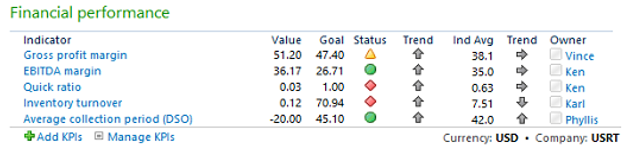
This is an example of standard financial performance indicators that appear on the CFO Role Center right out of the box. Each individual employee, team, or department would have a similar dashboard that shows the metrics they need to track and measure.
These are more of monthly indicators.
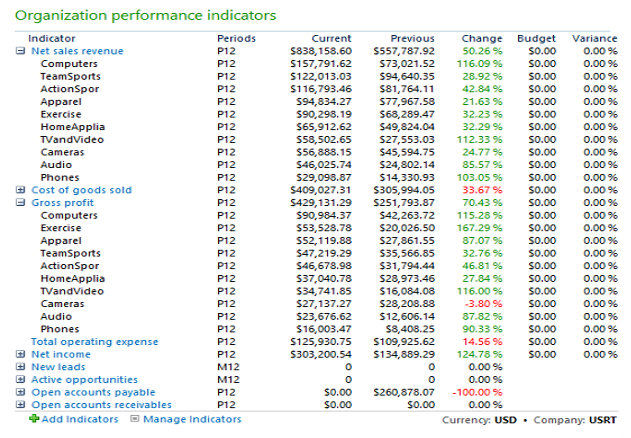
These are performance indicators that can be updated in real time. As shipments are made or customers invoiced, these metrics are instantly updated.
The data is easy to read and provides numerous, valuable insights into your day to day operations. With the analytic features Microsoft Dynamics AX provides you’ll be able to:
- Reflect and communicate your organization's business strategies, objectives, and measurements
- Automate the collection and summarization of performance data
- Evaluate your overall business performance according to your strategy
- Track performance and measure fulfilment of business goals
- Obtain real-time overviews of objectives and measures, allowing you to take immediate action
These analytics help provide valuable insight needed to better operate your business. Receive the answers you need in real-time by using this secure and flexible platform to turn raw data into useful and easy to understand business knowledge. There is no need for external reporting tools or data replication – all the information you need is available on your customizable dashboard. No more hassles!

|
|
About the Author - Keith Reali Keith is a financial and management executive with broad experience in all aspects of business including general management, project management, cost management and financial management.
Contributing Writers: Elena Britton and Sarah Van Wambeke
|


